




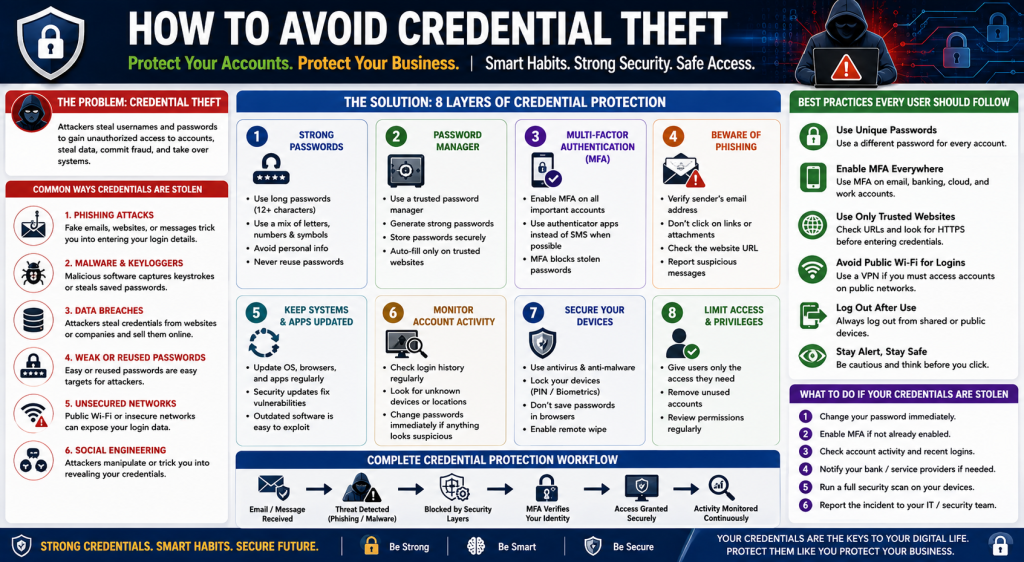
Protect Your Accounts. Protect Your Business. | Strong Credentials. Smart Security. Safe Access.
The Problem: Credential Theft
Credential theft is one of the most common cyberattacks today. It occurs when attackers steal usernames, passwords, authentication tokens, or other login credentials to gain unauthorized access to personal or business accounts.
Once attackers obtain valid credentials, they can access email accounts, cloud services, banking platforms, customer databases, and business applications without triggering immediate suspicion because they appear to be legitimate users.
Credential theft often leads to identity theft, financial fraud, data breaches, ransomware attacks, and complete account takeovers.
A typical credential theft attack follows this process:
Attacker
↓
Phishing email, malware, fake website, or data breach
↓
User enters login credentials or credentials are stolen automatically
↓
Attacker logs into the account
↓
Sensitive data is accessed, stolen, or misused
The best defense is to make stolen credentials useless through multiple layers of security.
1. Use Strong and Unique Passwords
Weak or reused passwords are one of the easiest ways for attackers to compromise accounts.
Protect yourself by:
- Creating long passwords (12–16 characters or more)
- Combining uppercase and lowercase letters, numbers, and symbols
- Avoiding names, birthdays, or common words
- Using a different password for every account
If one website is breached, unique passwords prevent attackers from accessing your other accounts.
2. Use a Password Manager
Remembering dozens of complex passwords is nearly impossible.
A password manager helps you:
- Generate strong passwords automatically
- Store passwords securely
- Fill login details safely
- Avoid password reuse
This removes the temptation to create weak or repeated passwords.
3. Enable Multi-Factor Authentication (MFA)
Passwords alone are no longer enough.
Multi-Factor Authentication requires an additional verification step, such as:
- Authentication app
- Security key
- Fingerprint or facial recognition
- One-time verification code
Even if an attacker steals your password, they cannot access your account without the second authentication factor.
Whenever possible, use an authenticator app or hardware security key instead of SMS verification.
4. Watch for Phishing Attempts
Most stolen credentials begin with phishing.
Always verify:
- The sender’s email address
- Website URLs before logging in
- Unexpected attachments
- Requests asking for passwords or personal information
Never enter login credentials after clicking an unexpected link. Instead, visit the official website directly through your browser.
5. Keep Your Devices Updated
Outdated software contains security vulnerabilities that attackers actively exploit.
Keep updated:
- Operating system
- Web browsers
- Business applications
- Mobile devices
- Security software
Regular updates close known vulnerabilities before attackers can use them.
6. Monitor Your Account Activity
Review your accounts regularly for unusual activity.
Look for:
- Unknown login locations
- New devices
- Password changes you did not make
- Unexpected email forwarding rules
- Unauthorized purchases or transactions
Early detection can stop attackers before serious damage occurs.
7. Secure Your Devices
Your computer and mobile phone are the gateway to your accounts.
Protect them by:
- Using antivirus or endpoint protection
- Locking devices with strong PINs or biometrics
- Encrypting storage
- Avoiding untrusted software
- Logging out of shared computers
A secure device helps keep your credentials secure.
8. Limit Access and Permissions
Not everyone needs access to every system.
Businesses should follow the Principle of Least Privilege, giving users access only to the information and systems required for their role.
Regularly:
- Remove unused accounts
- Disable former employee accounts
- Review administrator privileges
- Audit permissions
Reducing unnecessary access limits the damage if credentials are compromised.
What To Do If Your Credentials Are Stolen
If you suspect your login credentials have been compromised:
- Change your password immediately.
- Enable Multi-Factor Authentication if it is not already active.
- Sign out of all active sessions.
- Review recent account activity.
- Remove unknown devices.
- Notify your IT or security team.
- Scan your devices for malware.
- Monitor your financial accounts for suspicious activity.
Quick action can often prevent a small incident from becoming a major security breach.
Complete Credential Protection Architecture
Internet
↓
Email & Web Protection
↓
Phishing Detection
↓
Identity Verification
↓
Multi-Factor Authentication
↓
Secure Login
↓
Continuous Monitoring
↓
Protected Business Systems
Business Security Implementation
An effective credential protection strategy includes:
- Strong password policies
- Password managers
- Multi-Factor Authentication
- Identity and Access Management (IAM)
- Endpoint Detection and Response (EDR)
- Email security
- AI-powered threat detection
- User awareness training
- Continuous login monitoring
- Regular security audits
For organizations using Fortinet, this strategy can include:
- FortiAuthenticator – Secure identity management and authentication
- FortiToken – Multi-Factor Authentication
- FortiClient – Endpoint protection
- FortiGate – Firewall and web filtering
- FortiAnalyzer – Security monitoring and reporting
- FortiGuard – Real-time threat intelligence
Final Goal
Credential theft prevention is about more than creating stronger passwords. It is about protecting digital identities through multiple layers of security that verify every login, monitor user activity, detect suspicious behavior, and prevent attackers from turning stolen credentials into successful attacks.
By combining strong authentication, secure devices, continuous monitoring, employee awareness, and modern security technologies, individuals and businesses can significantly reduce the risk of credential theft and protect their most valuable digital assets.