




AI-Powered Phishing Protection Solution
The Problem: Phishing Attacks
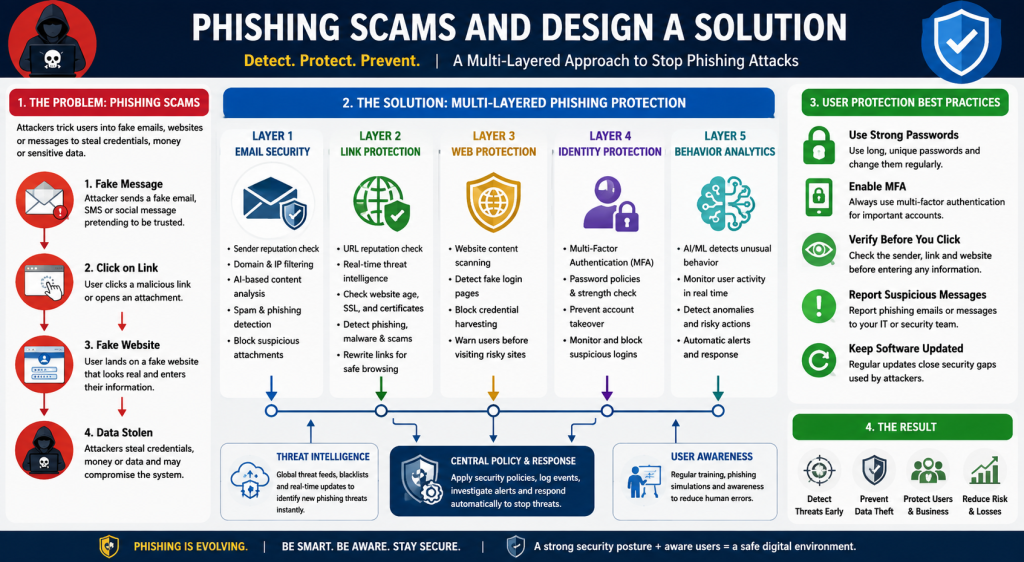
Phishing is one of the biggest online threats facing individuals and businesses today. It is a method where attackers trick users into believing that a fake email, message, website, or identity is legitimate. The goal is usually to steal passwords, financial information, business data, or gain access to systems.
A typical phishing attack follows this process:
Attacker
↓
Fake email, SMS, social message, or website
↓
User clicks a link or opens a file
↓
Fake login page or malware installation
↓
Credentials, money, or data are stolen
Modern phishing attacks are becoming more advanced because attackers use automation and artificial intelligence to create realistic messages, imitate trusted organizations, and target specific individuals.
A complete solution requires multiple layers of protection.
1. Intelligent Message Analysis
Before an email or message reaches the user, it should be analyzed by a security system.
The system examines:
- Sender reputation
- Email domain history
- Previous malicious activity
- Message content
- Attached files
- Links inside the message
- Communication patterns
Example:
A message appears to come from a bank:
The system detects:
- Domain is newly created
- Domain name copies a trusted brand
- Sender has no reputation
- Message contains a login request
Result:
The message is blocked or marked as dangerous.
2. AI-Based Language and Behavior Detection
Artificial intelligence can analyze the wording and intention of messages.
The system searches for common phishing techniques:
- Urgency
- Fear
- Pressure
- Fake authority
- Financial requests
- Requests for passwords or personal information
Examples:
“Your account will be closed within 30 minutes.”
“Your manager requires an urgent payment.”
“Verify your password immediately.”
AI assigns a risk score:
0–30: Low risk
31–70: Suspicious
71–100: Dangerous
High-risk messages are blocked before reaching users.
3. Link and Website Protection
Many phishing attacks depend on fake websites.
Before a user opens a link, the security system checks:
- Domain reputation
- Website ownership
- Domain age
- SSL certificate
- Malware history
- Similarity to trusted websites
- Hidden scripts
- Login page behavior
Example:
Real website:
Fake website:
www-companny-security-login.com
The system identifies:
- Similar spelling
- Fake identity
- Suspicious login form
The website is blocked.
4. Website Identity Verification
Users often cannot easily tell whether a website is real or fake.
A protection system verifies:
- Is this website owned by the claimed organization?
- Has this domain been reported before?
- Does the website behave normally?
- Is it collecting unnecessary information?
A fake banking website may look identical to the real one, but the security system can detect:
- Unknown domain
- Suspicious code
- Credential collection behavior
- Poor reputation
The connection is stopped.
5. Multi-Factor Authentication Protection
Even if a password is stolen, attackers should not be able to access an account.
Multi-factor authentication adds additional protection:
Password
+
Mobile authentication code
+
Device verification
A stolen password alone becomes useless.
Businesses should require MFA for:
- Email accounts
- Cloud systems
- Banking systems
- Administration accounts
- Remote access
6. AI Fraud and User Behavior Detection
Security systems should monitor normal user activity and detect unusual behavior.
Example:
Normal activity:
Employee logs in from their normal location, accesses normal files, and works normal hours.
Suspicious activity:
- Login from another country
- Large data download
- New email forwarding rules
- Unusual money transfers
- Access to sensitive files
AI detects the difference and raises an alert.
7. Employee Protection and Reporting
Technology alone is not enough. Users need simple protection tools.
Employees should have options such as:
- Report phishing button
- Security warnings
- Automatic link checking
- Training simulations
Every reported attack improves the organization’s ability to detect future threats.
Complete Anti-Phishing Security Architecture
Internet
↓
Email Security Gateway
↓
AI Threat Detection
↓
Sender Reputation Check
↓
Attachment and Link Scanning
↓
User Inbox
↓
Browser Protection
↓
Identity Security and MFA
↓
Continuous Monitoring
Business Security Implementation
A strong business solution combines:
- Email filtering
- Web filtering
- Firewall protection
- Endpoint security
- Threat intelligence
- MFA
- User awareness training
- AI-based monitoring
For organizations using Fortinet technology, this approach can include:
- FortiMail for email protection
- FortiGate for firewall and web filtering
- FortiGuard threat intelligence for malicious websites and threats
- FortiClient for endpoint protection
- FortiAnalyzer for security monitoring
Final Goal
The purpose of an anti-phishing system is not only to block suspicious emails. The goal is to create a complete security layer that:
- Detects threats before users interact with them
- Prevents fake websites from stealing information
- Protects accounts even after password theft
- Identifies unusual behavior
- Reduces human error
- Stops attackers from gaining access to systems
The future of phishing protection will rely on a combination of artificial intelligence, strong identity protection, secure infrastructure, and educated users.
I can continue with the second major threat: password theft and account takeover in the same format.